Android Studio) Changing Java Version (Gradle, JDK, AGP)
When developing with Android Studio, you need to keep the versions of the following components aligned:
- Gradle
- AGP (Android Gradle Plugin)
- Gradle JDK & Java Version
gradle-wrapper.properties (Gradle)
1
2
3
4
5
distributionBase=GRADLE_USER_HOME
distributionPath=wrapper/dists
distributionUrl=https\://services.gradle.org/distributions/gradle-8.7-bin.zip
zipStoreBase=GRADLE_USER_HOME
zipStorePath=wrapper/dists
You can change the Gradle version in this file. (In the code above, it’s 8.7.)
https://docs.gradle.org/current/userguide/compatibility.html
Gradle runs on top of the JVM, so there’s a Gradle version compatibility requirement based on the Gradle JDK.
AGP (Android Gradle Plugin)
AGP is an Android project plugin that runs on top of Gradle (the build automation tool).
Therefore, there’s an AGP version compatibility requirement based on the Gradle version.
libs.versions.toml
1
2
3
4
5
6
7
8
9
10
11
12
[versions]
agp = "8.5.2"
junit = "4.13.2"
junitVersion = "1.2.1"
espressoCore = "3.6.1"
appcompat = "1.7.0"
material = "1.12.0"
constraintlayout = "2.1.4"
navigationFragment = "2.7.7"
navigationUi = "2.7.7"

...
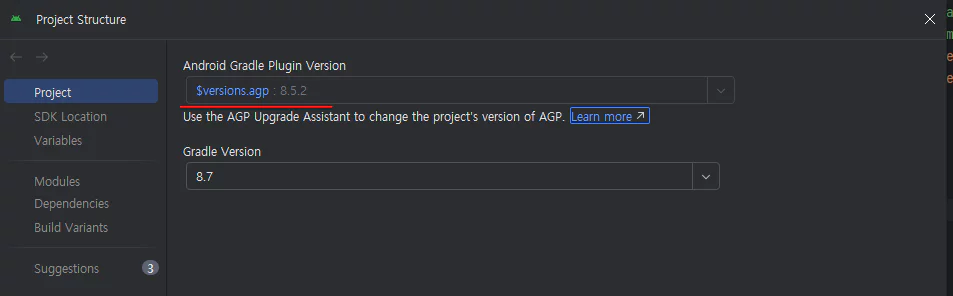
If you’re using the plugins DSL, you can change the AGP version in the libs.version.toml file.
If you’re using Groovy, you can change it in the build.gradle(app) file.
It’s also possible directly from Android Studio.
(window) File → Project Structure → Project → AGP Version
Gradle JDK & Java Version
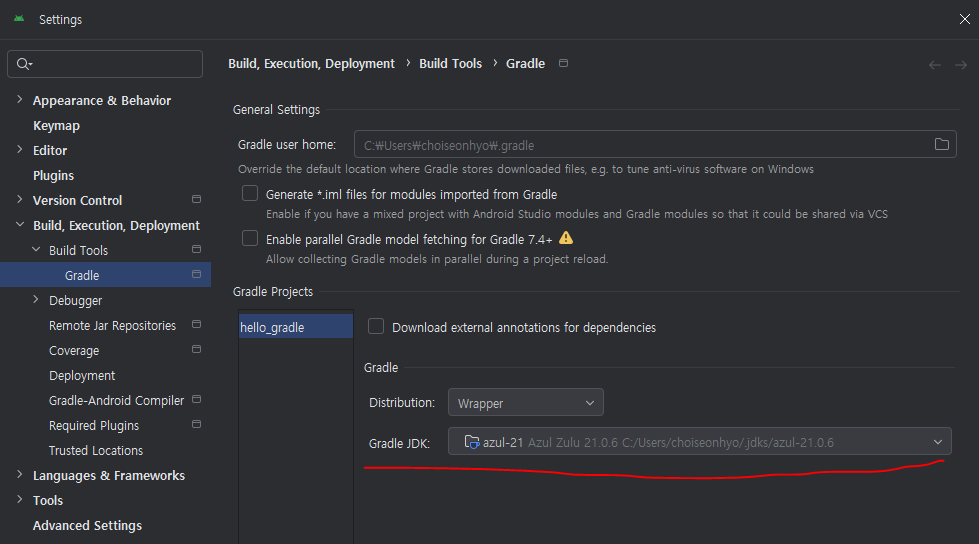
To choose which JDK will run the Gradle build:
(window) File → Settings → Build, Execution, Deployment → Build Tools → Gradle
build.gradle (app)
1
2
3
4
    compileOptions {
        sourceCompatibility = JavaVersion.VERSION_17
        targetCompatibility = JavaVersion.VERSION_17
    }
This gradle setting defines the spec used when compiling the source code.
For example, given the following settings:
Gradle JDK = 21
sourceCompatibility = 11
targetCompatibility = 17
Gradle performs compilation, testing, packaging, and so on in a Java 21 environment while building. (gradle jdk)
Java 11 syntax is used when compiling the source code. (source)
The generated bytecode is made to run only on a Java 17 JVM. (target)
The .class file’s major version changes from 55 (Java 11) to 61 (Java 17).
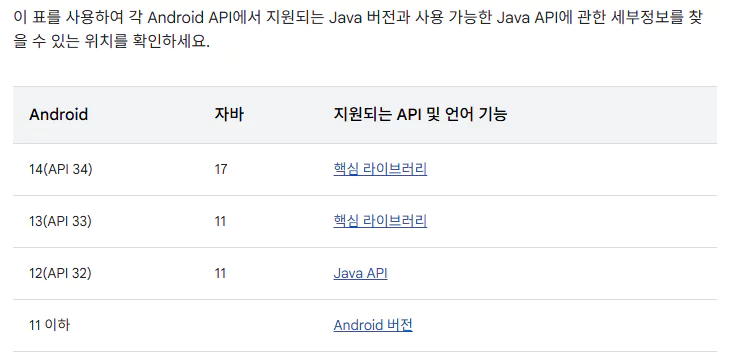
The Gradle JDK is the Java version used for the Gradle build itself, and it’s unrelated to the table above. The table above concerns source/target compatibility.
Each Android API level requires a specific AGP, and each AGP supports a fixed set of Java versions. Version 15 (API 35) also updates to Java 17.
https://developer.android.com/about/versions/15/summary?utm_source=chatgpt.com&hl=ko
If you’re reproducing or trying to understand a project, start by checking the Gradle version, then align the AGP and Gradle JDK accordingly.