Flutter Yolo11n Sample
Flutter YOLO11n Sample Repository
https://github.com/cornpip/flutter_vision_ai_demos
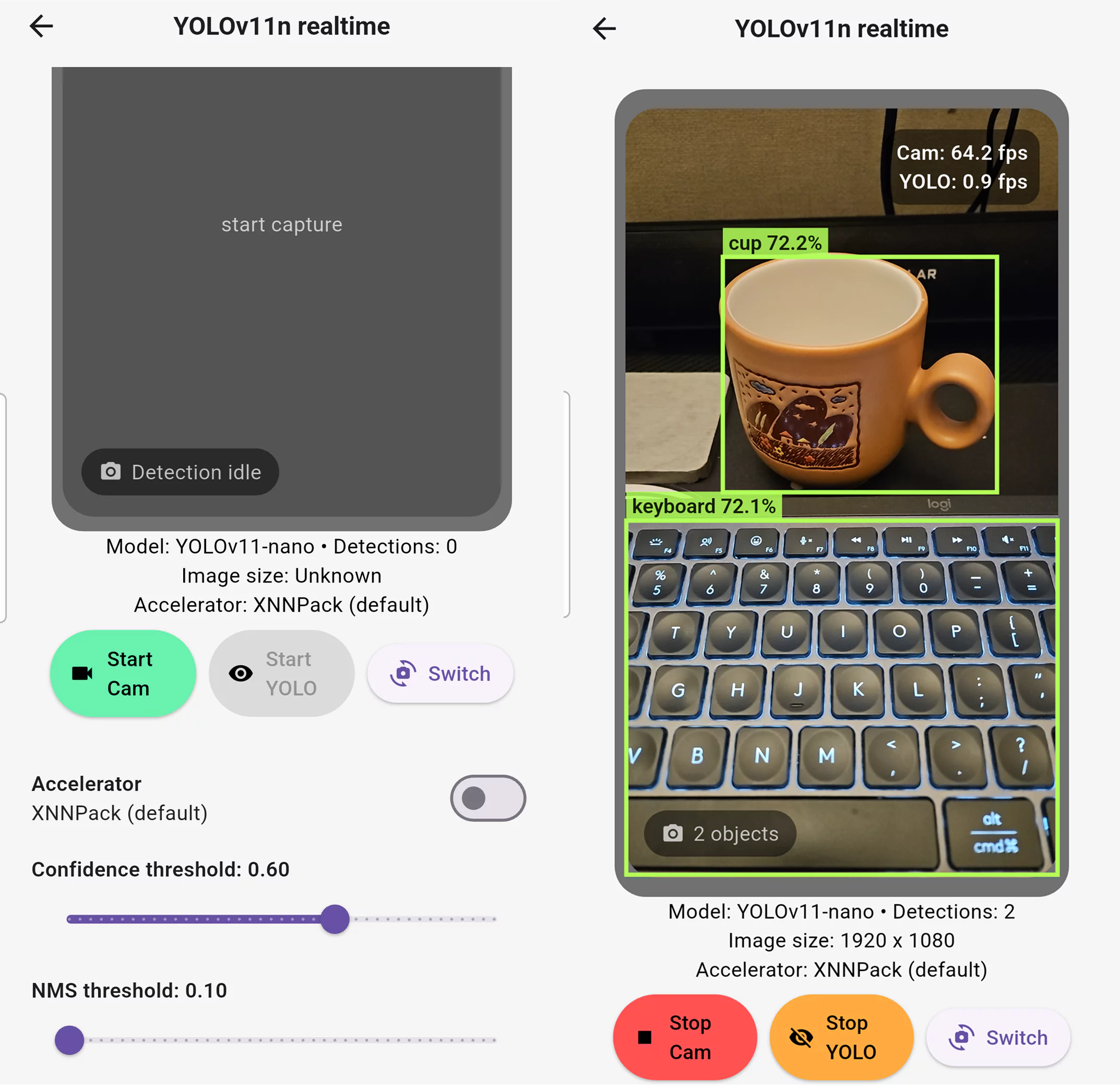
Let’s go over a few key points.
YOLO11 To TFLite
https://github.com/cornpip/pt_to_tflite
In the sample, yolo11n.pt was converted to tflite.
yolo11_to_tflite.py
It can be run inside the ultralytics/ultralytics:latest image.
YOLO11 provides a method for exporting the model to tflite.
https://docs.ultralytics.com/ko/integrations/tflite/
Camera Plugin
Using the camera plugin, you hook a process into the camera stream like this: await controller.startImageStream(\_processCameraImage);
By default, frames aren’t queued up — instead, older frames are dropped so that only the latest frame is always processed.
CameraPreview is also supported by the plugin.
For the front camera, though, you need to apply a horizontal flip (mirroring) to get the familiar selfie view.
The preview’s horizontal flip can be applied using Matrix4.identity.
If you want to overlay boxes on the preview, it’s best to also flip the image fed into prediction (predict) the same way, so it matches.
Isolate
To keep the UI thread from blocking in Flutter, heavy work like inference or preprocessing needs to be handled in a separate Isolate.
For this, we reuse the FFI Plugin project structure covered in a previous post.
1
2
3
4
5
6
7
8
    // main isolate
    _inferenceIsolate = await Isolate.spawn(
      _yoloIsolateEntry,
      initArgs,
      errorsAreFatal: true,
    );
    _inferenceSendPort = await readyPort.first as SendPort;
    readyPort.close();
1
2
3
4
5
6
7
8
9
10
11
12
13
14
15
16
17
18
19
20
21
22
23
24
25
    // _yoloIsolateEntry (separate isolate)
    final SendPort readyPort = initialMessage[0] as SendPort;
    ...
    final receivePort = ReceivePort();
    readyPort.send(receivePort.sendPort);
    ...
    await for (final dynamic message in receivePort) {
      ...
      final command = message[0];
      if (command == 'predict') {
        final payload =
            (message[1] as Map<dynamic, dynamic>).cast<String, dynamic>();
        final SendPort replyTo = message[2] as SendPort;
        try {
          final detections = handler.predict(payload);
          replyTo.send(detections);
        } catch (error, stackTrace) {
          replyTo.send({
            'error': error.toString(),
            'stackTrace': stackTrace.toString(),
          });
        }
      }
      ...
    }
We create a separate \_yoloIsolateEntry Isolate, spawned from main.
\_yoloIsolateEntry first sends its own internal receivePort back through the readyPort it was given (used for the initial handshake).
Once main receives the receivePort from \_yoloIsolateEntry, it closes the readyPort (which was only needed for the handshake).
\_yoloIsolateEntry then waits for messages on its receivePort inside the separate isolate.
1
2
3
4
5
6
7
8
9
10
11
12
13
    final sendPort = _inferenceSendPort;
    sendPort.send([
      'predict',
      _serializeCameraImage(
        cameraImage,
        sensorOrientation,
        lensDirection,
      ),
      responsePort.sendPort,
    ]);

    final dynamic result = await responsePort.first;
    responsePort.close();
It sends a predict request to \_yoloIsolateEntry along with a responsePort, and awaits the result.
\_yoloIsolateEntry runs the predict process and sends the result back through the responsePort.
TFLite Predict
Preprocessing, FFI (C++/OpenCV), inputTensor
CamerImage → \_CameraFrameData → \_preprocess (including FFI) → inputTensor
1
2
3
4
5
6
7
8
9
10
11
12
    // _serializeCameraImage
    final planes = cameraImage.planes
        .map(
          (plane) => {
            'bytesPerRow': plane.bytesPerRow,
            'bytesPerPixel': plane.bytesPerPixel,
            'bytes': TransferableTypedData.fromList(
              [Uint8List.fromList(plane.bytes)],
            ),
          },
        )
        .toList();
When passing messages between isolates, sending data through a SendPort normally copies it,
but wrapping it in TransferableTypedData lets you “transfer” it as-is, without copying.
For larger data like a big Uint8List, wrapping it in TransferableTypedData helps with performance and efficiency.
Up through \_CameraFrameData, the data is in YUV420 (Android) or NV12 (iOS) format,
and the \_preprocess FFI call handles rotation, horizontal flip, resizing, and letterboxing all at once, returning an RGB byte array.
The YOLO11 model uses letterbox resizing by default for its input image (preserving the original aspect ratio and padding the remaining area).
When working with a TFLite model, it’s critical to implement the input/output image processing exactly the way it was done during model training.
The 1D RGB byte array coming out of \_preprocess is laid out to match the model’s input size.
TFLite expects an NHWC shape, e.g. [1, 640, 640, 3].
OutputTensor and Postprocessing
The YOLO11 model’s output shape is [1, 84, 8400].
The outputBuffer is initialized to zero with the same structure, and then prediction runs via \_interpreter.run(inputTensor, outputBuffer);.
- 1 = batch size. The result of processing a single image per inference run.
- 84 = the number of values provided for each detection candidate (anchor-free cell). Typically, the first 4 are the box coordinates (x, y, w, h), and the remaining 80 are the per-class probabilities based on COCO classes.
- 8400 = the number of detection candidates extracted across the whole image.
\_flattenTensor: flattens the outputBuffer filled in by Interpreter.run into a 1D Float32List so it’s easy to iterate over in one pass.
\_decodeDetections: interprets the flattened buffer according to the YOLO format.
For each box, it reads xCenter, yCenter, width, height, objectness, and class logits, applies sigmoid to get the class probabilities, and multiplies by objectness to compute the confidence. Anything below the threshold is discarded, and the rest go through _buildBoundingBox for letterbox correction/normalization and conversion into a Detection. Finally, _nonMaxSuppression (NMS) is run to remove overlapping boxes with high IoU.
Delegate
1
2
3
4
5
6
7
    _interpreter = Interpreter.fromBuffer(
      modelBytes,
      options: interpreterOptions,
    );
    // interpreterOptions.addDelegate(GpuDelegateV2());
    // interpreterOptions.addDelegate(XNNPackDelegate());
    // interpreterOptions.useNnApiForAndroid = true;
You can choose which backend (delegate) TFLite uses to run inference; by default it runs on the CPU.
XNNPack: TensorFlow Lite’s CPU-optimized backend.
It improves CPU-based inference performance by leveraging CPU vector instructions (ARM NEON, x86 SIMD, etc.) and multithreading.
- No extra hardware required
- Stably supports most operations (ops)
- Efficient for small models and INT8/FP32 models
- Provides consistent performance across platforms
GpuDelegateV2: GPU backend.
It offloads parallel operations like Conv and MatMul to the GPU, greatly improving inference speed for CNN-based models.
- Based on OpenGL ES / Vulkan (Android) or Metal (iOS)
- Supports FP16 computation, improving memory and compute efficiency
- Well suited to real-time image/vision models
- Some operations fall back to CPU if unsupported on GPU
NNAPI: Android’s Neural Networks API backend.
It delegates inference to the device’s hardware accelerators (NPU, DSP, GPU, etc.) via the Neural Networks API.
- The Android OS decides the actual execution hardware (NPU, DSP, GPU, etc. — OS’s call)
- Often effective for INT8 quantized models
- Performance varies significantly by device and manufacturer
- Unsupported operations fall back to the CPU reference kernel
iOS Support
1
2
3
    final rotationDegrees = Platform.isIOS
        ? 0 // iOS preview is already oriented; avoid double rotation on boxes
        : controller.description.sensorOrientation;
On iOS, the image format obtained from CameraImage (NV21) is different, so it’s handled accordingly.
Also, since the image we get already has rotation applied, we skip the rotation step.
I tried to include the OpenCV iOS SDK in the FFI Plugin as well, but the OpenCV binary is over 500MB. (GitHub rejects pushes over 100MB by default.)
If you build OpenCV separately, selecting only the architectures and modules you need, you could make it much smaller.
So for now, the iOS SDK isn’t included, and when building the yolo sample for iOS, please follow the guide below.
Clone the ffi_plugin project and place the OpenCV iOS SDK there.
In the yolo sample’s pubspec.yaml, change the ffi_plugin_look dependency to point to the local path.
1
2
3
4
5
6
ex)
  ffi_plugin_look:
#    git:
#      url: https://github.com/cornpip/ffi_plugin_test.git
#      ref: master
    path: ../ffi_plugin_look