Flutter FFI Plugin Project
New Project FFI Plugin
Android Studio’s New Flutter Project wizard has an FFI Plugin type. Let’s take a look.
https://github.com/cornpip/ffi_plugin_test.git
After creating the project, I added the OpenCV SDK along with some sample code.
Note: the OpenCV setup was only applied on Android.
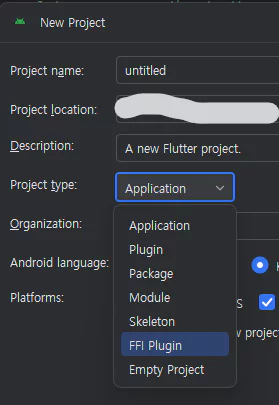 new flutter project
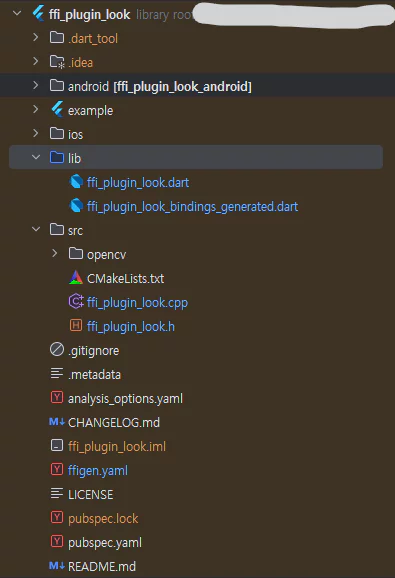 project structure
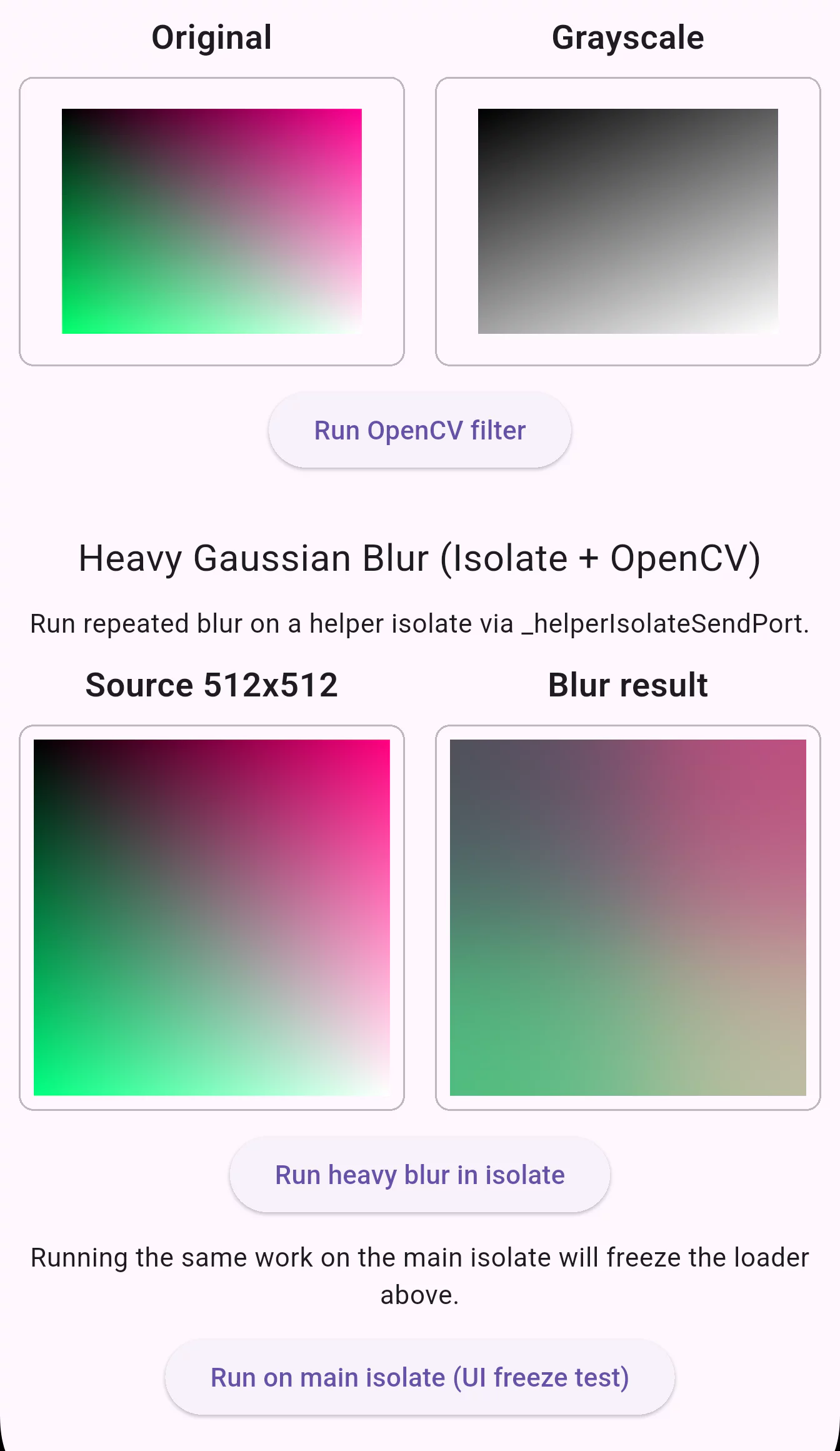 test
test
ffigen.yaml
When you create a project as an FFI Plugin, you get the basic FFI structure along with ffigen.yaml.
1
2
3
4
5
6
7
8
9
10
11
12
13
14
15
16
17
18
# ffigem.yaml
# Run with `dart run ffigen --config ffigen.yaml`.
name: FfiPluginLookBindings
description: |
  Bindings for `src/ffi_plugin_look.h`.
output: 'lib/ffi_plugin_look_bindings_generated.dart'
headers:
  entry-points:
    - 'src/ffi_plugin_look.h'
  include-directives:
    - 'src/ffi_plugin_look.h'
preamble: |
  // ignore_for_file: always_specify_types
  // ignore_for_file: camel_case_types
  // ignore_for_file: non_constant_identifier_names
comments:
  style: any
  length: full
Once you fill in the options and run the script, it generates the binding Dart code for you.
1
2
3
4
5
6
7
8
9
10
11
12
13
14
15
16
17
18
# ffi_plugin_look_bindings_generated.dart
void apply_heavy_blur(
  ffi.Pointer<ffi.Uint8> rgba_pixels,
  int width,
  int height,
  int iterations,
) {
  return _apply_heavy_blur(rgba_pixels, width, height, iterations);
}

late final _apply_heavy_blurPtr =
    _lookup<
      ffi.NativeFunction<
        ffi.Void Function(ffi.Pointer<ffi.Uint8>, ffi.Int, ffi.Int, ffi.Int)
      >
    >('apply_heavy_blur');
late final _apply_heavy_blur = _apply_heavy_blurPtr
    .asFunction<void Function(ffi.Pointer<ffi.Uint8>, int, int, int)>();
2025.04.08 - [flutter] - Processing Images in Flutter with C++ OpenCV + 16KB Memory Page Size
(the example here is from the previously published post)
The generated code corresponds to the *lib/native/native_process.dart* part of the earlier example.
I made *lookupFunction* get called only once, using late final.
CMakeLists.txt
target_link_options(ffi_plugin_look PRIVATE "-Wl,-z,max-page-size=16384")
The default CMake setup also includes an option to support Android 15’s 16k page size.
In the earlier example I modified the global link flags, but here I specified the 16KB page-alignment option only for a specific target.
ffi_plugin_look.dart
*ffi_plugin_look.dart* corresponds to the *lib/native/native_control.dart* part of the earlier example.
It contains DynamicLibrary.open, pointer handling, FFI usage logic, and so on.
_helperIsolateSendPort plays the role that *compute(_convert_to_gray_func, ..)* played in the earlier example.
It’s common to run time-consuming work on a separate isolate.
If you run heavy work on the main isolate (the default execution context), the UI thread appears to freeze while it runs.
1
2
3
4
5
6
7
8
9
10
11
12
13
14
15
16
17
18
19
20
21
22
23
24
25
26
27
28
29
30
31
32
33
34
35
36
37
38
39
40
41
42
43
44
45
46
47
48
49
50
51
52
53
54
55
56
57
58
59
60
61
62
63
64
65
66
67
68
69
/// The SendPort belonging to the helper isolate.
Future<SendPort> _helperIsolateSendPort = () async {
  // Receive port on the main isolate to receive messages from the helper.
  // We receive two types of messages:
  // 1. A port to send messages on.
  // 2. Responses to requests we sent.
  final Completer<SendPort> completer = Completer<SendPort>();

  final ReceivePort receivePort = ReceivePort()
    ..listen((dynamic data) {
      print(data);
      if (data is SendPort) {
        // The helper isolate sent us the port on which we can sent it requests.
        completer.complete(data);
        return;
      }
      if (data is _SumResponse) {
        // The helper isolate sent us a response to a request we sent.
        final Completer<int> completer = _sumRequests[data.id]!;
        _sumRequests.remove(data.id);
        completer.complete(data.result);
        return;
      }
      if (data is _HeavyBlurResponse) {
        final Completer<Uint8List>? completer =
            _heavyBlurRequests.remove(data.id);
        if (completer != null) {
          final Uint8List pixels =
              data.rgbaPixels.materialize().asUint8List();
          completer.complete(pixels);
        }
        return;
      }
      throw UnsupportedError('Unsupported message type: ${data.runtimeType}');
    });

  // Start the helper isolate.
  await Isolate.spawn((SendPort sendPort) async {
    final ReceivePort helperReceivePort = ReceivePort()
      ..listen((dynamic data) {
        if (data is _SumRequest) {
          final int result = _bindings.sum_long_running(data.a, data.b);
          final _SumResponse response = _SumResponse(data.id, result);
          sendPort.send(response);
          return;
        }
        if (data is _HeavyBlurRequest) {
          final Uint8List rgba =
              data.rgbaPixels.materialize().asUint8List();
          final Uint8List blurred = _runHeavyBlurNative(
            rgba,
            data.width,
            data.height,
            data.iterations,
          );
          final _HeavyBlurResponse response = _HeavyBlurResponse(
            data.id,
            TransferableTypedData.fromList(<Uint8List>[blurred]),
          );
          sendPort.send(response);
          return;
        }
        throw UnsupportedError('Unsupported message type: ${data.runtimeType}');
      });
    sendPort.send(helperReceivePort.sendPort);
  }, receivePort.sendPort);

  return completer.future;
}();
*Future
Main isolate = the default one.
Helper isolate = a separate one created via isolate.spawn.
Since the helper isolate ends with sendPort.send(helperReceivePort.sendPort);,
final SendPort helperIsolateSendPort = await _helperIsolateSendPort;
lets us obtain the helper’s ReceivePort.
There are two ReceivePorts: the main isolate’s port receives responses, and the helper isolate’s port receives requests.
Once the helper port finishes its work and sends a response back to the main-side port, the main-side listener completes the matching Completer. That’s the overall flow.
compute vs ( Isolate.spawn + ReceivePort )
compute
- Internally creates a separate isolate and hides all the message formatting/transmission for you.
- Good for offloading a simple CPU-bound task (a one-off job).
Isolate.spawn + ReceivePort
- Lets you reuse an isolate to exchange multiple requests, or pass complex types.
- You control message routing, error handling, and isolate lifetime yourself, so it gives you much more flexibility and control.
pubspec.yaml (./example)
There are a few ways to consume the FFI Plugin package you’ve created:
- Publish to pub.dev (public)
- GitHub (private & public)
- Local path (private)
and so on.
If you consume it via GitHub:
1
2
3
4
5
  # pubspec.yaml(example)
  ffi_plugin_look:
    git:
      url: https://github.com/cornpip/ffi_plugin_test.git
      ref: master
Set it up as above, run Pub get, and save.
If you want to pull the repository’s latest commit after the first Pub get, you need to delete pubspec.lock and run get again.
1
2
3
4
5
6
7
8
9
10
11
12
13
14
15
# main.dart
import 'package:ffi_plugin_look/ffi_plugin_look.dart' as ffi_plugin_look;
    ....
    matrixResult = ffi_plugin_look.multiplyMatrices(
      const [1, 2, 3, 4],
      const [5, 6, 7, 8],
      2,
    );
    ....
    final Uint8List filtered = await ffi_plugin_look.applyHeavyBlurAsync(
      pixels,
      _heavyDemoWidth,
      _heavyDemoHeight,
      iterations: 1000,
    );
Now you can use the FFI plugin you built.