Cookies: Server <-> Client Set-Cookie Issues
Cookies are sent and received through the header area. If the server’s response headers include a key called Set-Cookie with a String value, that’s a cookie.
Cookie options
For a server and a client to exchange cookies, certain options are required depending on the system configuration. Let’s look at an example.

Looking at Set-Cookie in the Response Headers, there’s a key called Authorization holding a token, with options passed along separated by semicolons.
Expiration
- Max-Age: sets the cookie’s valid duration in seconds.
- Expires: specifies the date until which the cookie is valid.
Based on the expiration options:
- Session Cookie: a cookie without Max-Age or Expires options. It’s deleted when the browser is closed.
- Persistent Cookie: a cookie with Max-Age or Expires options. It isn’t deleted regardless of browser closure, until the valid time expires.
Secure
- If true, the cookie is only sent over HTTPS. The default is false.
SameSite
- None: requests with any method are allowed.
However, if it’s None but Secure isn’t true, Set-Cookie won’t work and a warning about needing Secure will appear.
“Set-Cookie works” means the cookie gets automatically and properly stored in the browser’s cookie storage. - Lax: for cross-origin requests, cookies are only sent with GET method requests.
- Strict: for cross-origin requests, cookies are not sent at all.
Origin here means host + port. See the article below for details.
2023.07.20 - [Web] - CORS
HttpOnly
- true: prevents the client from accessing the cookie via the DOM. The default is false.
Path
- The cookie is only sent to the server for subrequests that include the configured path. In other words, the configured path refers to the server.
The default is “/”, which sends the cookie with every request.
e.g.) if it’s “/api/post”, the cookie won’t be sent with a request to /api/user.
Domain
This seems to be the hardest part.
1. Server to client
In a setup where the server is deployed (HTTPS) and the client is local, even if the server passes a cookie to the client while satisfying sameSite and secure, the client still can’t receive it. If no domain is configured, the domain of the cookie the server responds with defaults to the server’s own domain, and a browser can only handle cookies belonging to its own domain. In other words, even if the server (cornpip.com) hands off a cookie with the domain cornpip.com (the default) to the client (cornpip.store), cornpip.store cannot handle it. That doesn’t mean the cookie disappeared. If you actually navigate to cornpip.com in the browser (even with no page to render, since there’s no response) and check the cookie storage, you’ll find the cookie did arrive.
So would setting the domain to localhost fix it? If you set the cookie domain to localhost, it isn’t stored, and you get a warning instead. Presumably because localhost isn’t considered a domain. That seems to be the case.
2. Client to server
In short, when the domains differ, you simply can’t pass a value via Set-Cookie in the first place. Even if you match the domain on the response cookie, the client still can’t handle it. So the workaround was: the server passes the value to the client via a header, and the client manually moves it into cookie storage.
In this situation, when the client sets withCredentials to true and makes a request, the cookie isn’t sent from storage.
When the client sets the cookie itself, does the browser refuse to send it because the default domain is the client’s own domain, which differs from the server’s domain?
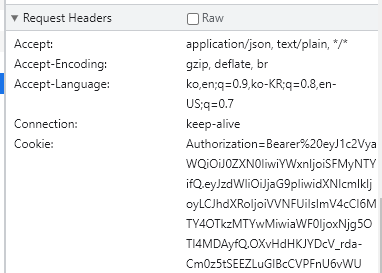 When it succeeds, the request is made with the Cookie attached.
So let’s try setting the server’s domain when the client manually puts the token value from the header into a Cookie via cookies.set(). The result: the cookie set with the domain configured as the server’s domain turns out to make cookies.get() return null. This is the same problem we ran into in 1. A browser can only handle cookies belonging to its own domain. A cookie set with a domain other than its own becomes a cookie the browser simply can’t handle.
So in the end, with a server (deployed, HTTPS) and a client (local):
- The server can’t use Set-Cookie.
- The domain can’t be localhost.
- Even if the client sends a request with credentials allowed, the Cookie doesn’t get sent.
- I think this is because the domains don’t match.
Things I’d like to verify
 Cookie storage on a velog post
Looking at velog, you can see cookies from other domains sitting in the storage too (though, granted, the domain names are pretty trustworthy). This result makes me think that cross-origin cookie storage is possible using the domain option.
Regarding issue 1:
In a situation where both the server and client are deployed but on different domains, if the server sets the cookie domain to match the client, would it actually go through? (Since localhost doesn’t work.) Would it still behave as expected if one of the two were on HTTP?
Regarding issue 2:
Looking at the cookie storage in the velog post, you can see cookies from other domains — but is that an area the client can actually manipulate?