CORS
CORS (Cross-Origin-Resource Sharing)
 URL
URL
domain name = root name + TLD
If you don’t specify a port, as in https://blog.cornpip.store, https behaves the same as https://blog.cornpip.store:443,
and http://blog.cornpip.store behaves the same as http://blog.cornpip.store:80.
CORS stands for Cross-Origin-Resource Sharing, and it’s related to sharing resources across different origins.
So what is an origin? It means host + port number.
(The very existence of CORS implies that browsers enforce the Same-Origin Policy by default.)
CORS operates in one of three ways, depending on the situation.
A. Preflight Request
- The browser doesn’t send the request directly — it first sends a preflight request using the OPTIONS method.
- The server sends back information such as Access-Control-Allow-Origin/Methods/Headers,
and Access-Control-Max-Age (sets, in seconds, how long the browser can cache this preflight response)
in the response headers. - The browser compares the preflight request it sent with the policy returned by the server, and if the request is deemed safe, it sends the actual request.
 (1) You can see the preflight request being sent before the XMLHttpRequest (the actual request).
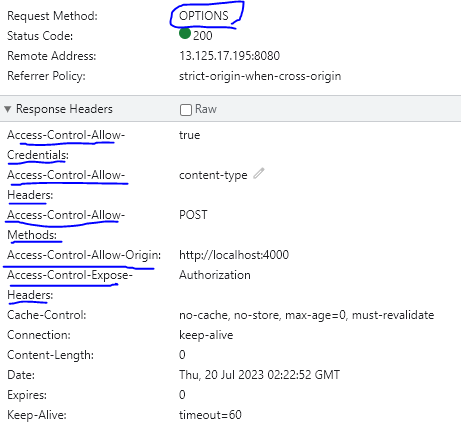 (2) You can see the policy information in the OPTIONS method and the response headers.
The server’s CORS configuration for image (2) is as follows.
1
2
3
4
5
6
(code1)
    	configuration.setAllowedOrigins(Arrays.asList("http://localhost:4000"));
        configuration.setAllowedMethods(Arrays.asList("*"));
        configuration.setAllowedHeaders(Arrays.asList("*"));
        configuration.setAllowCredentials(true);
        configuration.addExposedHeader(JwtUtil.AUTHORIZATION_HEADER);
In the response for (2), the Headers don’t show any particular information.
It seems the method wildcard only tells you whether the method used in the preflight request is allowed, not the full set of allowed methods. Even though the configuration allows everything, the response only shows the method matching the request method (if you send a GET request, Allow-Methods shows GET).
In the network tab, the preflight request isn’t always logged first, and if the preflight isn’t allowed, the actual request returns as failed while in a pending state.
At first glance, it might seem like the preflight request could hurt performance.
That’s why the Access-Control-Max-Age option exists. The response to a preflight request can be cached in the browser via the Access-Control-Max-Age option, and once cached, subsequent preflight responses are served from the cache instead of the server.
B. Simple Request
Instead of sending a preflight request, the browser sends the actual request directly, then checks Access-Control-Allow-Origin in the server’s response to determine whether the CORS policy is satisfied.
A few conditions must be met for a request to qualify as a simple request, and in most cases those conditions aren’t met, so a preflight request is used instead.
C. Credentialed Request
A credentialed request follows the same flow as a preflight request, but requires additional configuration on top of that.
By default, information stored in the browser can’t be included in a request without an additional option. That’s why the credentials option is needed.
- same-origin - includes credentials only for requests to the same origin
- include - includes credentials for all requests
- omit - never includes credentials in any request
These are the available options. axios’s withCredentials: true behaves the same as include.
The server also needs additional settings beyond what’s required for a plain preflight request.
- Access-Control-Allow-Credentials = true
- The wildcard character (*) can’t be used in Access-Control-Allow-Origin.
- Can the wildcard character (*) also not be used in Access-Control-Allow-Methods/Headers?
As shown in code1, using the wildcard character for Methods and Headers didn’t actually cause an error.
*_There might be parts that don’t work functionally even so (worth being skeptical about).
*_Not setting rules 1 and 2 does cause an error.