Solving CORS with an nginx Reverse Proxy
Terminology before we get started
Domain
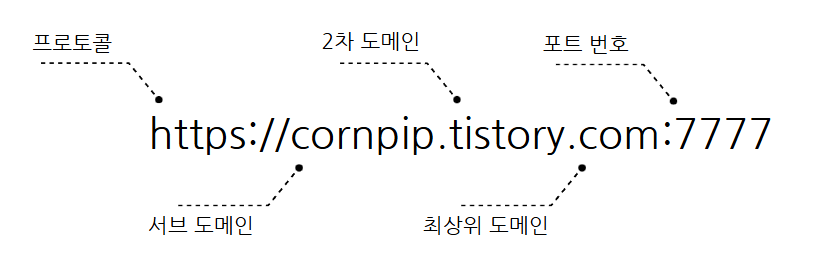 domain
Top-Level Domain (TLD): classifies internet addresses.
ex) .com, .org, .net, .edu, .kr, .jp, .uk
Second-Level Domain (SLD): represents the unique name of an organization or website.
ex) google, naver, tistory, youtube
Subdomain: represents a sub-area of the main domain.
Root domain: the domain’s base address, usually made up of SLD + TLD.
SOP (Same-Origin Policy)
A policy that web browsers enforce for security, allowing requests only to resources with the same origin.
Same origin means the protocol, domain, and port are all identical.
Page A: https://example.com
Resource B: https://api.example.com
Even the case above is not the same origin. Even with just a subdomain difference, it’s treated as a different origin.
CORS (Cross-Origin Resource Sharing)
A mechanism designed to work around the Same-Origin Policy.
SOP is a web browser policy, and CORS doesn’t come into play for server-to-server communication.
Forward/Reverse Proxy
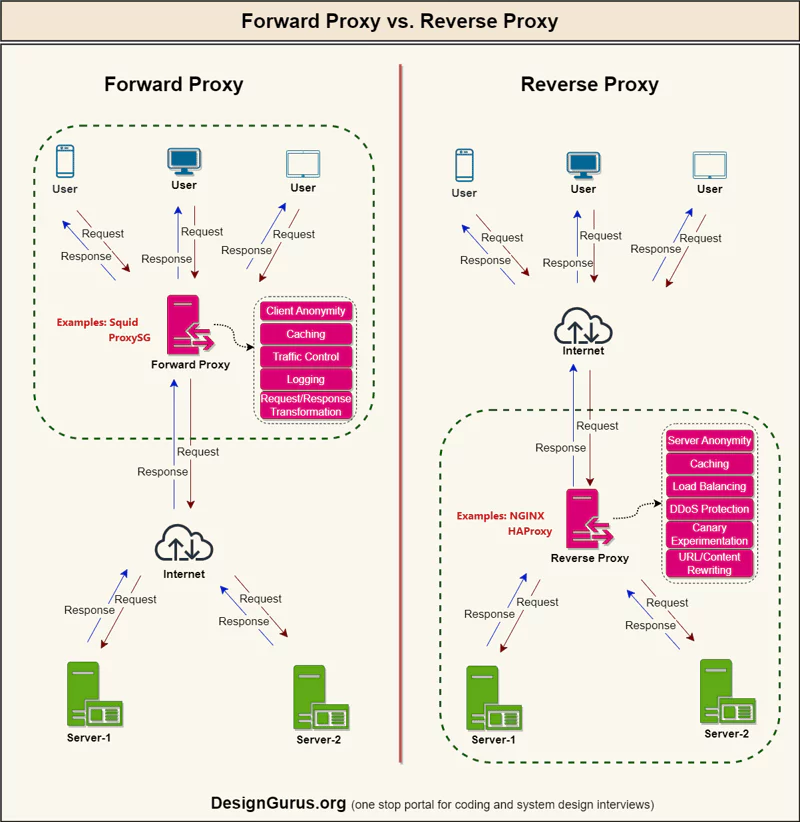
| Characteristic | forward proxy | reverse proxy |
| Purpose | Forwards the client’s requests on its behalf | Handles requests on behalf of the server |
| Main goal | Anonymity protection, filtering, bypassing blocks | Load balancing, security hardening, SSL termination, caching |
| Target | Client (user) | Server (service provider) |
Think of forward proxy in terms of an intranet.
Solving CORS with an nginx reverse proxy
System configuration
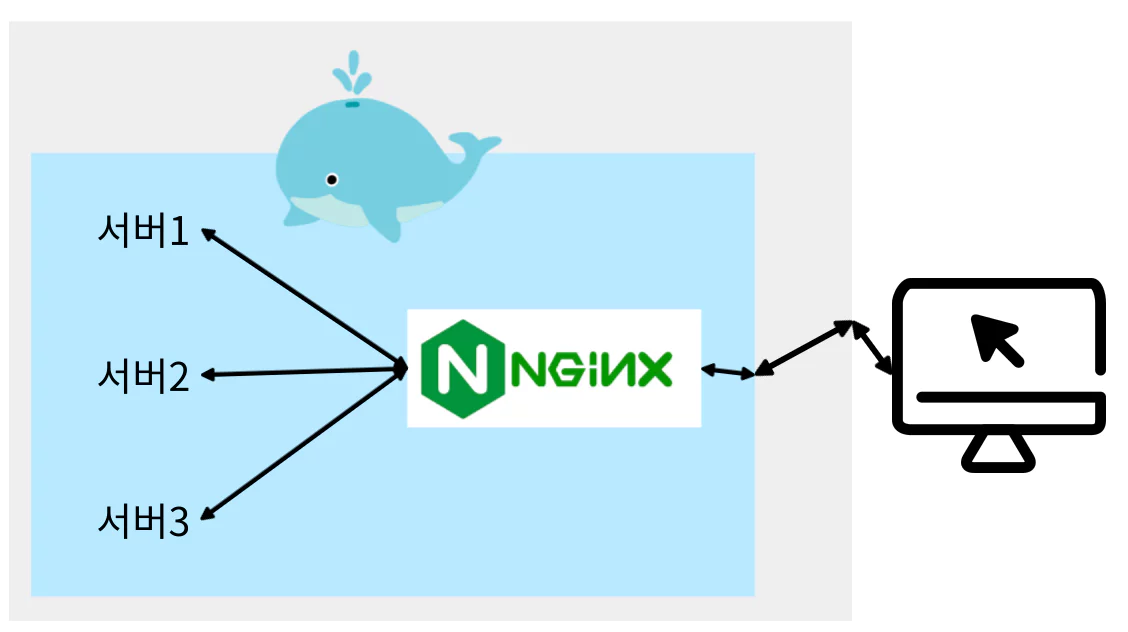 An example system built with Docker
Host: the destination domain
Origin: the source domain
client <=> nginx
nginx serves the static files (html, css, …), and since the client sends requests to itself (nginx), Host and Origin can be made the same.
nginx <=> server, nginx reverse proxy configuration
Example nginx variables
$http_host = 213.111.23.11:9999 (host including the port)
$host = 213.111.23.11 (host excluding the port)
1
2
3
4
5
6
7
8
9
10
11
12
13
14
15
16
17
18
19
20
21
22
23
24
25
26
27
28
29
30
31
## nginx.conf

http {
    include       mime.types;
    default_type  application/octet-stream;

    sendfile        on;
    keepalive_timeout  65;
    client_max_body_size 30M;
    ....

    # If the request URL and origin differ, you need to explicitly allow the origin instead of using a wildcard, or the policy will block it
    map $http_origin $origin_allowed {
        default 0;
        http://localhost:1111 1;
    }

    map $origin_allowed $allow_origin {
        default "*";
        1 $http_origin;
    }

    # http
    server {
        listen 80;
        server_name _;

        include common/_http.conf;
    }
    ...
}
1
2
3
4
5
6
7
8
9
10
11
12
13
14
15
16
17
## _http.conf

location /server {
    include common/_cors-header.conf;
    include common/_cors-options-response.conf;

    # It's fine as long as Host and Origin match, or even if only Host is present
    # When only Host is present, use $http_host (if it's the default port, $http is fine too)
    # Once a DNS is attached, Origin must be present; only when using an IP address is it possible to omit Origin
    rewrite ^/server_prefix/(.*)$ /$1 break;
    proxy_pass http://server:8088;
    proxy_set_header Host $http_host;
    proxy_set_header Origin $scheme://$http_host;
    proxy_set_header X-Real-IP $remote_addr;
    proxy_set_header X-Forwarded-For $proxy_add_x_forwarded_for;
    proxy_set_header X-Forwarded-Proto $scheme;
}
1
2
3
4
5
6
7
8
9
10
11
12
13
14
15
16
17
18
19
20
21
22
23
24
25
26
27
28
29
30
31
32
33
## _cors-header.conf

add_header 'Access-Control-Allow-Origin' $allow_origin always;
add_header 'Access-Control-Allow-Methods' 'GET, POST, OPTIONS, PUT, DELETE, PATCH' always;
add_header 'Access-Control-Allow-Headers' 'Authorization, Content-Type, Accept' always;
add_header 'Access-Control-Allow-Credentials' 'true' always;
add_header 'Vary' 'Origin, Access-Control-Request-Method, Access-Control-Request-Headers' always;

add_header Cache-Control "no-cache, no-store, max-age=0, must-revalidate";
add_header Pragma "no-cache";
add_header Expires "0";
add_header Connection "keep-alive";
add_header Keep-Alive "timeout=20";
add_header X-Content-Type-Options "nosniff";
add_header X-Frame-Options "DENY";
add_header X-XSS-Protection "0";
add_header Vary "Origin, Access-Control-Request-Method, Access-Control-Request-Headers";

## _cors-options-response.conf

# The if block is processed before the global block
if ($request_method = 'OPTIONS') {
    add_header 'Access-Control-Allow-Origin' $allow_origin always;
    add_header 'Access-Control-Allow-Methods' 'GET, POST, OPTIONS, PUT, DELETE, PATCH' always;
    add_header 'Access-Control-Allow-Headers' 'Authorization, Content-Type, Accept' always;
    add_header 'Access-Control-Allow-Credentials' 'true' always;
    add_header 'Vary' 'Origin, Access-Control-Request-Method, Access-Control-Request-Headers' always;

    add_header 'Content-Length' 0;
    add_header 'Content-Type' 'text/plain charset=UTF-8';
    add_header 'Access-Control-Max-Age' 7200;
    return 204;
}
add_header applies to the response the client receives; it’s not header configuration that gets forwarded to the server.
It would be different if static file serving happened at a different origin and requests were sent to nginx as a reverse proxy,
but when the client sends a request to itself (nginx), none of the add_header directives above are actually needed to avoid hitting CORS.
proxy_set_header configurations that worked well
The X-aa-bb headers are unrelated to CORS.
1. Setting only Host, without Origin (use $http_host if it’s not the default port)
With a DNS server attached, setting only Host without Origin doesn’t work.
It only worked without Origin when requesting by IP address.
1
proxy_set_header Host $http_host;
- Make Origin match Host
Whether you use $http_host or $host, just apply the same value to both Origin and Host.
1
2
3
4
5
6
7
8
9
10
proxy_set_header Host $http_host;
proxy_set_header Origin $scheme://http_host;

# ==============================================
proxy_set_header Host $host;
proxy_set_header Origin $scheme://host;

# When applying https to nginx and using it as a proxy (while internal communication is http)
proxy_set_header Host $http_host;
proxy_set_header Origin http://$http_host;
- Setting Host and having the server’s own allowOrigin configured also works.
1
2
3
4
5
6
proxy_set_header Host $http_host;
proxy_set_header Origin $scheme://abc:5555;

==========================================
proxy_set_header Host $host;
proxy_set_header Origin $scheme://abc:5555;
Excluding the Origin header seems to make it be treated as server-to-server communication, so the CORS mechanism doesn’t run
In every case, it seems that leaving out the Host header from the request causes Spring Boot to return a 400 from some other validation.
(Will check a few more things and update/refine the nginx.conf in this post.)