docker-compose nginx load-balancing (spring, node, ws)
nginx.conf
1
2
3
4
5
6
7
8
9
10
11
12
13
14
15
16
17
18
19
20
21
22
23
24
25
26
27
28
29
30
31
32
33
34
35
36
37
38
39
40
41
42
43
user  nginx;
worker_processes  auto;

error_log  /var/log/nginx/error.log notice;
pid        /var/run/nginx.pid;

events {
    worker_connections  1024;
}

http {
    include       /etc/nginx/mime.types;
    default_type  application/octet-stream;

    log_format  main  '$remote_addr - $remote_user [$time_local] "$request" '
                      '$status $body_bytes_sent "$http_referer" '
                      '"$http_user_agent" "$http_x_forwarded_for"';

    access_log  /var/log/nginx/access.log  main;

    sendfile        on;
    #tcp_nopush     on;

    keepalive_timeout  65;

    # This line is included by default in the nginx image, but it needs to be commented out if you want to mount your own conf as a volume
    # include /etc/nginx/conf.d/*.conf;

    #load balancer
    upstream test_server {
        server host.docker.internal:10010;
        server host.docker.internal:10011;
    }

    server {
        listen 80;
        server_name  localhost;

        location / {
            proxy_pass http://test_server;
        }
    }
}
Aside from the load balancer lines, this is the default conf that ships with the current latest nginx image.
If you don’t comment out include /etc/nginx/conf.d/*.conf;, the default.conf inside the conf.d folder gets applied even if you mount your own conf as a volume.
On Windows, there’s no conf.d folder when you download nginx (the Docker image does have one), so it works fine on Windows — which led me down a rabbit hole trying to figure out why it wasn’t behaving according to the conf I mounted in Docker.
Traffic that comes in through the nginx server’s listen port gets load-balanced across the upstream servers defined in location’s proxy_pass.
The default load-balancing method is round robin.
docker-compose.yml
1
2
3
4
5
6
7
8
9
10
11
12
13
14
15
16
17
18
19
20
21
22
23
24
25
26
27
28
29
30
31
32
33
34
35
36
37
services:
    nginx:
        image: nginx
        ports:
            - '80:80'
        volumes:
            - ./nginx.conf:/etc/nginx/nginx.conf
        environment:
            - NGINX_PORT=80

    server1:
        image: node:lts-alpine3.16
        ports:
            - '10010:8000'
        volumes:
            - ./server1:/server1
        command:
            - /bin/sh
            - -c
            - |
                cd server1
                npm i
                node server1.js

    server2:
        image: node:lts-alpine3.16
        ports:
            - '10011:8000'
        volumes:
            - ./server1:/server1
        command:
            - /bin/sh
            - -c
            - |
                cd server1
                npm i
                node server1.js
nginx.conf (web-socket)
1
2
3
4
5
6
7
8
9
10
11
12
13
14
15
16
17
18
19
20
21
22
23
24
25
26
27
28
29
30
31
32
33
34
35
36
37
38
39
40
41
42
43
44
45
46
47
48
49
50
51
52
53
54
user  nginx;
worker_processes  auto;

error_log  /var/log/nginx/error.log notice;
pid        /var/run/nginx.pid;

events {
    worker_connections  1024;
}

http {
    include       /etc/nginx/mime.types;
    default_type  application/octet-stream;

    log_format  main  '$remote_addr - $remote_user [$time_local] "$request" '
                      '$status $body_bytes_sent "$http_referer" '
                      '"$http_user_agent" "$http_x_forwarded_for"';

    access_log  /var/log/nginx/access.log  main;

    sendfile        on;
    #tcp_nopush     on;

    keepalive_timeout  65;

    #gzip  on;

    # include /etc/nginx/conf.d/*.conf;

    # WebSocket-related section
    map $http_upgrade $connection_upgrade {
        default upgrade;
        '' close;
    }

    #load balancer
    upstream websocket {
        server host.docker.internal:10010;
        server host.docker.internal:10011;
    }

    server {
        listen 80;

        # WebSocket-related section
        location / {
            proxy_pass http://websocket;
            proxy_http_version 1.1;
            proxy_set_header Upgrade $http_upgrade;
            proxy_set_header Connection $connection_upgrade;
            proxy_set_header Host $host;
        }
    }
}
WebSockets can be load-balanced too.
docker-compose.yml (web-socket)
1
2
3
4
5
6
7
8
9
10
11
12
13
14
15
16
17
18
19
20
21
22
23
24
25
26
27
28
29
30
31
32
33
34
35
services:
    nginx:
        image: nginx
        ports:
            - '80:80'
        volumes:
            - ./nginx.conf:/etc/nginx/nginx.conf
        environment:
            - NGINX_PORT=80

    server1:
        image: azul/zulu-openjdk-alpine:17-jre-latest
        ports:
            - '10010:8080'
        volumes:
            - ./server2:/server2
        command:
            - /bin/sh
            - -c
            - |
                cd server2
                nohup java -jar message_websocket-1.0-SNAPSHOT.jar

    server2:
        image: azul/zulu-openjdk-alpine:17-jre-latest
        ports:
            - '10011:8080'
        volumes:
            - ./server2:/server2
        command:
            - /bin/sh
            - -c
            - |
                cd server2
                nohup java -jar message_websocket-1.0-SNAPSHOT.jar
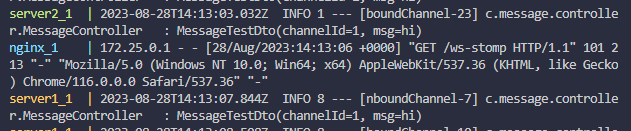
If you reconnect, you can see the connection bouncing back and forth between server1 and server2, confirming that the load is distributed.