Serialization/Deserialization Through Spring STOMP
Serialization/Deserialization Through Spring STOMP
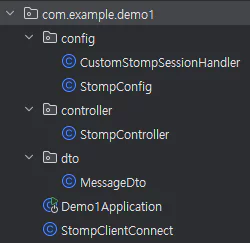
Let’s look at an example of STOMP serialization/deserialization in a project structured like the one above.
In the test environment, a StompClient is created and connected when the server starts.
1
2
3
4
5
6
7
8
9
10
11
12
13
14
15
//StompClientConnect.java
@Component
@Slf4j
@RequiredArgsConstructor
public class StompClientConnect implements ApplicationRunner {
    @NonNull
    private CustomStompSessionHandler customStompSessionHandler;

    @Override
    public void run(ApplicationArguments args) throws Exception {
        WebSocketStompClient webSocketStompClient = new WebSocketStompClient(new StandardWebSocketClient());

        webSocketStompClient.connectAsync("ws://localhost:8080/ws-stomp", customStompSessionHandler);
    }
}
Once connected, the overridden afterConnect method sends a messageDto to the STOMP server.
1
2
3
4
5
6
7
8
9
10
11
12
13
14
15
16
17
18
19
20
21
22
23
//CustomStompSessionHandler.java
@Component
@RequiredArgsConstructor
@Slf4j
public class CustomStompSessionHandler implements StompSessionHandler {
    @NonNull
    private final ObjectMapper objectMapper;

    @Override
    public void afterConnected(StompSession session, StompHeaders connectedHeaders) {
        log.info("Connected");
        MessageDto messageDto = new MessageDto();
        messageDto.setUsername("choi");
        messageDto.setMessage("hello");
        try {
            byte[] bytes = objectMapper.writeValueAsBytes(messageDto);
            session.send("/pub/message", bytes);
        } catch (JsonProcessingException e) {
            throw new RuntimeException(e);
        }
    }
    ...
 }
1
2
3
4
5
6
7
8
9
10
11
12
13
14
15
16
17
18
//StompController.java
public class StompController {
    @NonNull
    private final ObjectMapper objectMapper;

    @Async
    @MessageMapping("/message")
    public void message(MessageDto messageDto) {
        System.out.println(messageDto);
    }

    @Async
    @MessageMapping("/message2")
    public void message2(String s) throws JsonProcessingException {
        MessageDto messageDto = objectMapper.readValue(s, MessageDto.class);
    }
    ...
}
STOMP is a text-based protocol. (HTTP is also a text-based protocol.)
In a text-based protocol, text data is converted into bytes using a specific character encoding (usually UTF-8).
( Although STOMP is a text-oriented protocol, message payloads can be either text or binary. ) –spring docs
1
2
3
4
GET /index.html HTTP/1.1
Host: www.example.com
User-Agent: Mozilla/5.0
Accept: text/html
1
2
String httpRequest = "GET /index.html HTTP/1.1\r\nHost: www.example.com\r\nUser-Agent: Mozilla/5.0\r\nAccept: text/html\r\n\r\n";
byte[] byteArray = httpRequest.getBytes(StandardCharsets.UTF_8);
There’s also another kind of protocol, a binary-based protocol, where the data is already in byte form, so it’s simply sent according to an appropriate structure.
1
2
3
4
5
6
ByteBuffer buffer = ByteBuffer.allocate(10);
buffer.put((byte) 0x01);  // command
buffer.putInt(12345);     // data (e.g., an integer)
buffer.putShort((short) 0x6789); // data (e.g., a short)
buffer.put((byte) 0x0A);  // terminating byte
byte[] byteArray = buffer.array();
All network communication ultimately happens as a byte stream, and text-based protocols are no exception — they’re also encoded into a byte array before being sent.
Conclusion
In the CustomStompSessionHandler.java code, messageDto is converted into bytes before being sent.
If you send the messageDto object or a String directly instead, the STOMP server won’t receive it.
As mentioned above, all network communication happens as byte streams, and various languages/frameworks convert the received bytes into their own types.
In Java, this process is called serialization/deserialization.
Deserialization: the process of restoring a byte stream back into its original object
Serialization: the process of converting an object into a byte stream
Spring Boot includes the Jackson library (the ObjectMapper used in the example above) by default, so JSON serialization/deserialization works out of the box even without any extra configuration.
Looking at the STOMP route (@MessageMapping) in StompController.java, you can see that deserialized Java objects like MessageDto and String can be received with no additional setup at all.