Spring) Relaying Between a Client and a WebSocket Server
Relaying between a client and a WebSocket server = acting as both a WebSocket server and a client at the same time.
I spent a lot of time thinking about how, and at what timing, server1 and server2 should be connected.
As for the “how”: I couldn’t touch server2’s WebSocket Server, and server2 doesn’t use the STOMP protocol, so I struggled for a while trying to connect to server2 by treating server1 as a STOMP client. As for the timing: I initially tried connecting server1 and server2 when a request came in and closing the connection once the work was done, but that didn’t work out well.
In the end, for the implementation, I used the java-websocket library for the ws connection between server1 and server2 instead of Spring WebSocket STOMP.
1
implementation 'org.java-websocket:Java-WebSocket:1.5.4'
As for timing, I settled on connecting once the application starts and keeping that connection alive continuously.
Looking back now, the earlier approach (connecting and disconnecting per request) would also have been feasible.
(At first I worried that because requests were tied to this, tomcat thread pool threads might get held up — but that concern came from connecting it the wrong way.)
That said, since I can’t touch server2’s WebSocket Server, and it doesn’t support pub/sub on specific routes the way STOMP does, every request ends up connected to the same ws channel and receives the same messages. There’s also no difference in the business logic that runs on the message received after connecting, regardless of the request. So I decided there was no real reason to open a new session per request.
Structure

Since the client shouldn’t be exposed to certain information and work schedules need to be added/managed/logged, the client can’t connect directly to server2’s WebSocket.
So server1 has to act as both a WebSocket server and client at the same time, sitting between server2 and the client and relaying between them.
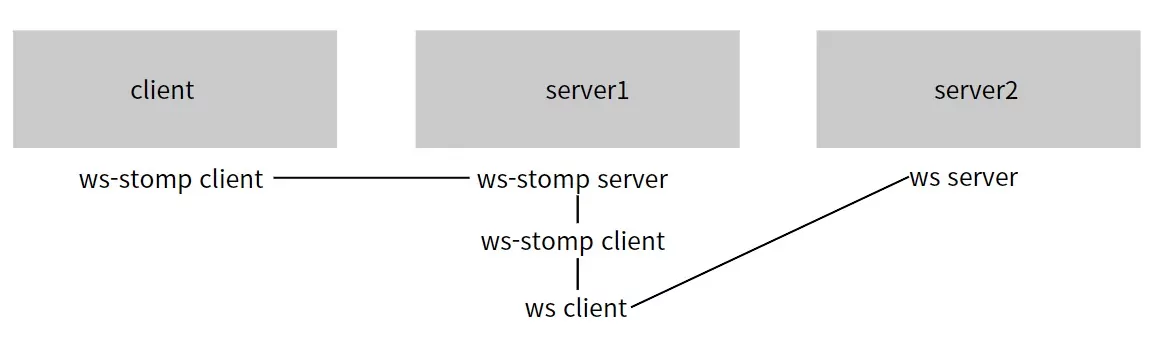
The connection flow between the WebSocket STOMP Client/Server and the WebSocket Client/Server looks like the diagram above.
Sequence
Here’s the sequence for acting as both a ws server and client at once to perform the relay:
- The Spring STOMP Server starts up. The client connects its STOMP Client to server1. (client <=> server1)
- server1 connects a STOMP Client to the STOMP Server that just started up. (server1 <=> server1)
- Once the STOMP Client is connected, a WebSocket Client connects to the WebSocket Server. (server1 <=> server2)
- When the WebSocket Client receives a message, it publishes to the STOMP Server, acting as a STOMP Client.
server1’s STOMP Server has to come up first for all the connections to be possible.
When connecting the STOMP Client, implementing the ApplicationRunner interface guarantees the connection happens only after the beans have been loaded.
Code
- STOMP configuration
1
2
3
4
5
6
7
8
9
10
11
12
13
14
15
@RequiredArgsConstructor
@Configuration
@EnableWebSocketMessageBroker
public class StompConfig implements WebSocketMessageBrokerConfigurer {
    @Override
    public void configureMessageBroker(MessageBrokerRegistry registry) {
        registry.enableSimpleBroker("/sub");
        registry.setApplicationDestinationPrefixes("/pub");
    }

    @Override
    public void registerStompEndpoints(StompEndpointRegistry registry) {
        registry.addEndpoint("/ws-stomp").setAllowedOriginPatterns("*");
    }
}
1
2
3
4
5
6
7
8
9
10
11
@RestController
@RequiredArgsConstructor
@Slf4j
public class StompController {
    @Async
    @MessageMapping("/목적지")
    public void test(String s) {
        //logic to send to the client
        ...
    }
}
- Connect the StompClient only after the Spring beans have loaded (i.e., after the STOMP Server is running).
1
2
3
4
5
6
7
8
9
10
11
12
13
14
@Component
@Slf4j
@RequiredArgsConstructor
public class SocketThread implements ApplicationRunner {
//runs after the beans have loaded (i.e., after Spring Boot has started up).
    ...
    @Override
    public void run(ApplicationArguments args) {
        WebSocketStompClient stompClient = new WebSocketStompClient(new StandardWebSocketClient());
        StompSessionHandler sessionHandler = new CustomStompSessionHandler(...);

        stompClient.connectAsync(wsEndPointUrl, sessionHandler);
    }
}
- Once the StompClient connection is open, connect the WebSocketClient.
1
2
3
4
5
6
7
8
9
10
11
12
13
14
public class CustomStompSessionHandler implements StompSessionHandler {
    ....
    @Override
    public void afterConnected(StompSession session, StompHeaders connectedHeaders) {
        ....
        CustomWebSocketClient customWebSocketClient = new CustomWebSocketClient(url, new Draft_6455(), session, destination);
        try {
            customWebSocketClient.connectBlocking(); // ws connection to server2
        } catch (InterruptedException e) {
            throw new RuntimeException(e);
        }
    }
    ....
}
- When a message arrives from server2, publish it to the STOMP Server, acting as a STOMP Client.
1
2
3
4
5
6
7
8
9
10
11
12
13
14
15
16
17
public class CustomWebSocketClient extends WebSocketClient {
    private StompSession session;
    private String destination;
    ....
    public CustomWebSocketClient(URI serverUri, Draft protocolDraft, StompSession session, String destination) {
        super(serverUri, protocolDraft);
        this.session = session;
        ....
    }
    @Override
    public void onMessage(String message) {
        // when a message arrives from server2, publish it to the stomp server
        session.send(destination, message.getBytes());
        ....
    }
    ....
}