React) Building a Context Menu
onContextMenu
Right-click boxes have their own dedicated event, onContextMenu, separate from onClick.
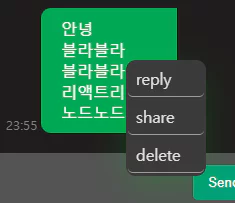 Right-clicking on a chat message
1
2
3
4
5
6
7
8
9
10
11
12
13
14
15
16
17
18
19
20
21
22
23
24
25
26
27
28
29
30
31
32
33
34
35
36
37
38
export const Wrapper = styled.div<{ x: string, y: string }>`
width: 80px;
background-color: rgb(58, 58, 58);
border-radius: 10px;
box-shadow: 0 12px 35px rgba(0, 189, 25, 0.2);
position: absolute;
left: ${props => props.x}px;
top: ${props => props.y}px;
`

export const Menu = styled.ul`
padding: 1px 2px;
margin: 0;
`

export const Item = styled.li`
list-style: none;
font-size: 22px;
height: 35px;
width: 100%;
display: flex;
cursor: pointer;
align-items: center;
margin-bottom: 2px;
border-bottom: solid;
border-radius: 5px;
border-width: 1px;
border-color: rgba(255, 255, 255, 0.5);
&:hover{
background-color: rgb(58, 58, 58);
}
`

export const Span = styled.span`
font-size: medium;
margin-left: 8px;
color: #e2e2e2;
`
1
2
3
4
5
6
7
8
9
10
11
12
13
14
15
16
17
18
19
20
21
const ContextMenu = ({ x, y }: contextMenuProps) => {
    return (
        <S.Wrapper
            onClick={(e: React.MouseEvent<HTMLDivElement>) => e.stopPropagation()}
            x={x}
            y={y}
        >
            <S.Menu>
                <S.Item>
                    <S.Span>reply</S.Span>
                </S.Item>
                <S.Item>
                    <S.Span>share</S.Span>
                </S.Item>
                <S.Item>
                    <S.Span>delete</S.Span>
                </S.Item>
            </S.Menu>
        </S.Wrapper>
    )
}
The ContextMenu component and its CSS look roughly like the above.
 Test
Test
1
2
3
4
5
6
7
8
9
10
11
12
13
14
15
16
17
18
19
20
21
22
23
24
25
26
27
28
interface locate {
    x: string;
    y: string;
}

const Test = () => {
    const [show, setShow] = useState(false);
    const [locate, setLocate] = useState<locate>({ x: "0", y: "0" });

    const contextMenuHandler = (e: React.MouseEvent<HTMLDivElement>) => {
        e.preventDefault();
        const { clientX, clientY } = e;
        setShow((pre) => !pre);
        setLocate({ x: clientX.toString(), y: clientY.toString() });
    }

    return (
        <>
            <div className="container" onContextMenu={contextMenuHandler}></div>
            {
                show &&
                <div className="close-wrapper" onClick={() => { setShow((pre) => !pre) }}>
                    <ContextMenu x={locate.x} y={locate.y} />
                </div>
            }
        </>
    )
}
This is the React code that drives the test.
e.preventDefault() blocks the browser’s default right-click behavior, then we grab the click coordinates and flip show to true.
1
2
3
4
5
6
7
8
9
10
.close-wrapper {
position: fixed;
top: 0;
left: 0;
width: 100%;
height: 100%;
display: flex;
align-items: center;
justify-content: center;
}
That’s the close-wrapper.css, and clicking it sets show back to false.
Looking at the second code block from the top, the ContextMenu component’s
onClick={(e: React.MouseEvent<HTMLDivElement>) => e.stopPropagation()} stops the click event from propagating up to close-wrapper. Without this, clicking on the menu itself would immediately close it.
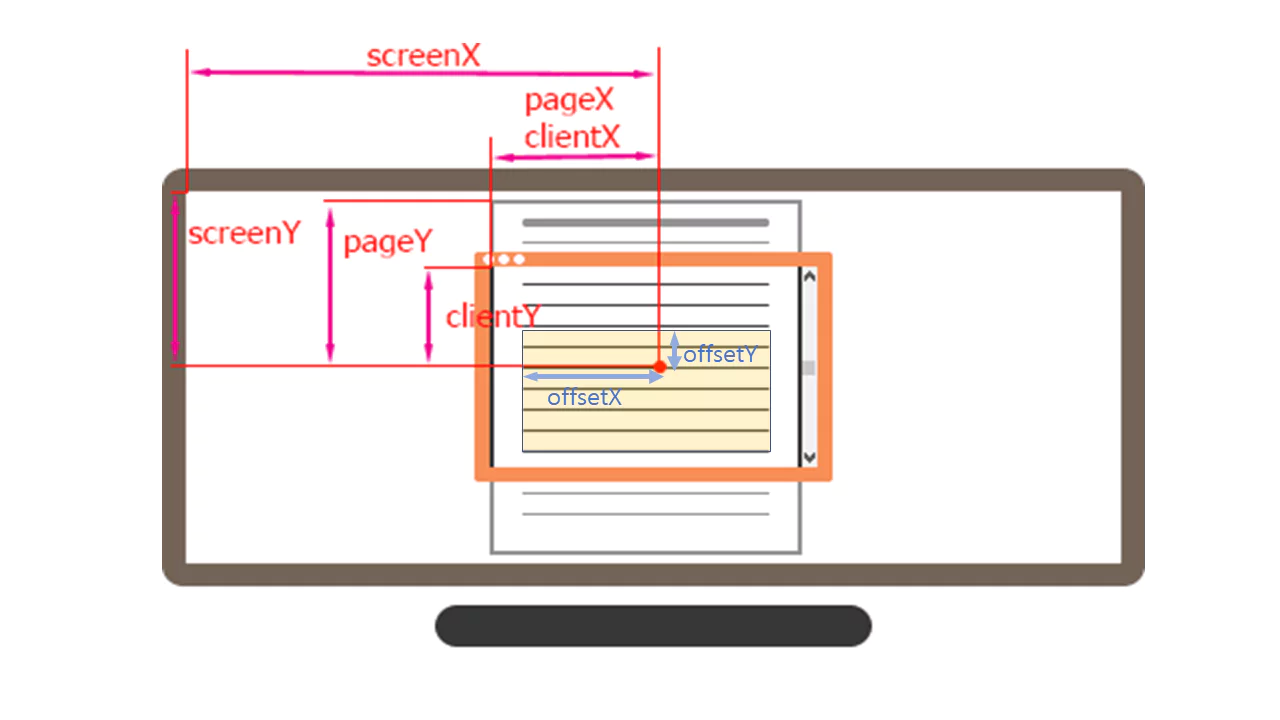
For reference, these are the kinds of mouse click coordinates you can get from the event — pick whichever ones fit your case,
and use them as variables for CSS properties like top and left.