Codex Skills
Install Skills
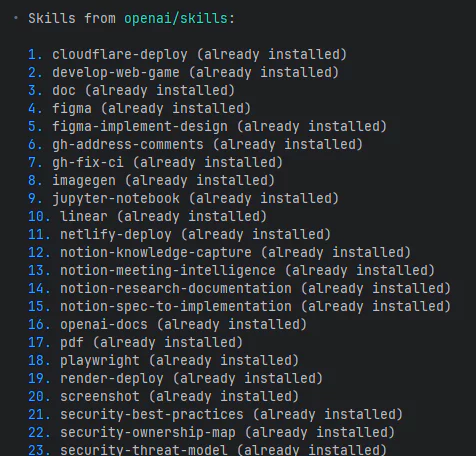
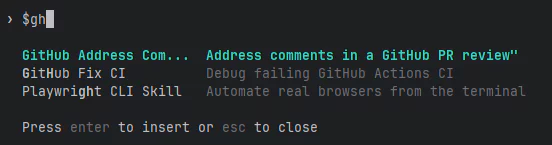 Codex skills are invoked with
 $.
skill-installer
It shows you a curated list of skills and asks which ones you want to install.
Just answer with whatever you want.
ex) install A B C D, install all (installs everything)
Official skills repository
https://github.com/openai/skills
Usage Skills
Document skills
pdf - reads and writes PDF files as structured data.
doc - reads and writes doc files as structured data.
spreadsheet - reads and writes Excel files as structured data.
1
2
3
4
5
// example

$pdf analyze sn74hc595.pdf and summarize it in Korean into $doc

$spreadsheet read type-test.xlsx and write up the scoring logic and the type-by-score mapping into $doc
Tip
Codex has gotten better at giving you progress briefings along the way. If you watch it work,
it’ll tell you when it got stuck trying to install something and switched to an alternative,
or when an alternative approach failed and it moved on to something else.
Going with the alternative usually still gets the job done, but
- follow the developer’s original intent
- avoid drifting too far off course as one workaround leads to another, and then another
With that in mind, whenever possible I prefer to resolve the actual failure so the work can proceed according to the original plan.
Examples of resolving failure causes
- setting up the required environment: pip, node, apt-get, …
- for network or access permission issues: “go ahead with elevated permissions”
- if root is needed: “the root password is xxxx, go ahead with sudo apt-get ~~”
If you keep hitting the same failure repeatedly, it’s worth documenting it in AGENTS.md.
If you want to jump in mid-task, just hit “Ctrl + c” to interrupt and then say what you want.
In the past, interrupting and resuming felt like it lost some context from the original request, but that happens much less often these days.
Notion skills
notion-knowledge-capture - extracts key insights from a conversation or document and writes them into Notion in a structured format.
notion-research-documentation - organizes research findings and writes them into Notion in a structured format.
notion-meeting-notes - organizes content by discussion/decisions/action items and writes it into a Notion meeting-notes template.
1
2
3
// example

$notion-knowledge-capture summarize this conversation and write it up in Notion
For skills that access external systems like Notion, it automatically sets up the required MCP connection and even gives you the authentication link.
If you get a notice saying a restart is needed to reflect the MCP connection status,
just exit the session and come back in with codex resume --last to continue.
Besides these, the Figma and GitHub-related skills also look useful.
+) The Figma skill connects via MCP to read design data and generate UI code, but a free Figma account only allows 6 calls per month.
There are currently around 30 curated skills (skills supported in the official repo),
so if there’s one that fits your workflow, it’s worth trying it out and comparing before/after.
Related posts
2025.11.10 - [AI/agent] - OpenAI Codex CLI·Web Review and Usage
2026.03.02 - [AI/agent] - How to Use OpenClaw - Housing Listing Briefing