lombok @Builder
Class-level @Builder
1
2
3
4
5
6
7
8
9
@Builder
public class Test {
    private String one;
    private Long two;

    public Test(Long two){
        this.two = two;
    }
}
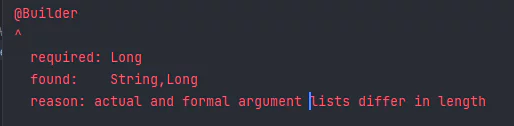
By default, lombok’s builder works as an allArgsConstructor.
So in the code above, @Builder tries to use a constructor that takes both one and two as arguments, but since that constructor isn’t defined, it causes a compile error. The only constructor defined is the one that takes two.
1
2
3
    public Test build() {
        return new Test(this.one, this.two);
    }
(If you write the code as shown above, you’ll get an error because the constructor being called isn’t defined.)
Constructor-level @Builder
1
2
3
4
5
6
7
8
9
public class Test {
    private String one;
    private Long two;

    @Builder
    public Test(Long two){
        this.two = two;
    }
}
Constructor-level @Builder avoids the allArgsConstructor behavior and works as intended.
1
2
3
4
5
6
7
8
9
10
11
12
13
14
15
16
17
18
19
20
21
22
23
24
25
26
27
28
29
30
31
32
public class Test {
    private String one;
    private Long two;

    public Test(Long two) {
        this.two = two;
    }

    public static TestBuilder builder() {
        return new TestBuilder();
    }

    public static class TestBuilder {
        private Long two;

        TestBuilder() {
        }

        public TestBuilder two(final Long two) {
            this.two = two;
            return this;
        }

        public Test build() {
            return new Test(this.two);
        }

        public String toString() {
            return "Test.TestBuilder(two=" + this.two + ")";
        }
    }
}
Looking at the code generated by constructor-level @Builder, you can see that the build method uses the constructor that takes two as an argument.
Conclusion
If you’re using @Builder without any extra options, use it at the constructor level.
References
https://velog.io/@park2348190/Lombok-Builder%EC%9D%98-%EB%8F%99%EC%9E%91-%EC%9B%90%EB%A6%AC