자바) Wrapper/ 표현식/ 이름붙은 반복문
자바) Wrapper/ 표현식/ 이름붙은 반복문
type check
Wrapper class type
1
2
3
4
5
6
7
8
9
10
11
12
13
    public static void main(String[] args) {
        String t1 = "TEST";
        System.out.println(t1.getClass().getName());
        //java.lang.String

        Integer t2 = 7777;
        System.out.println(t2.getClass().getName());
        //java.lang.Integer

        List<Integer> t3 = new ArrayList<>();
        System.out.println(t3.getClass().getName());
        // java.util.ArrayList
    }
Primitive type
1
2
3
4
5
6
7
8
9
    public static void main(String[] args) {
        int a1 = 3;
        float a2 = 5;
        double a3 = 7;

        System.out.println(Integer.class.isInstance(a1)); //true
        System.out.println(Float.class.isInstance(a2)); //true
        System.out.println(Double.class.isInstance(a3)); //true
    }
오버로딩으로 primitive typeof 구현 가능
1
2
3
4
5
6
7
8
9
10
11
12
13
14
15
16
17
18
19
class Check {
    public static Class<Integer> typeof(final int expr) {
        return Integer.TYPE;
    }

    public static Class<Long> typeof(final long expr) {
        return Long.TYPE;
    }

    public static Class<Float> typeof(final float expr) {
        return Float.TYPE;
    }

    public static Class<Double> typeof(final double expr) {
        return Double.TYPE;
    }

    // ...
}
Wrapper class
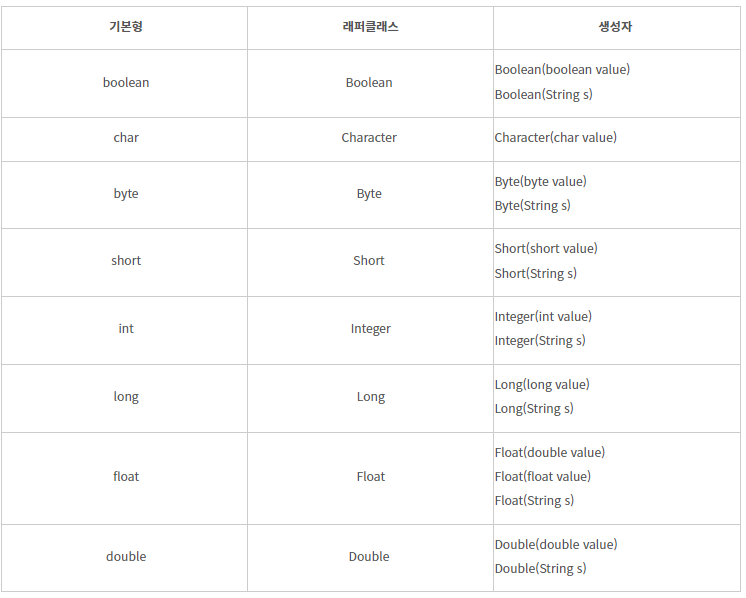
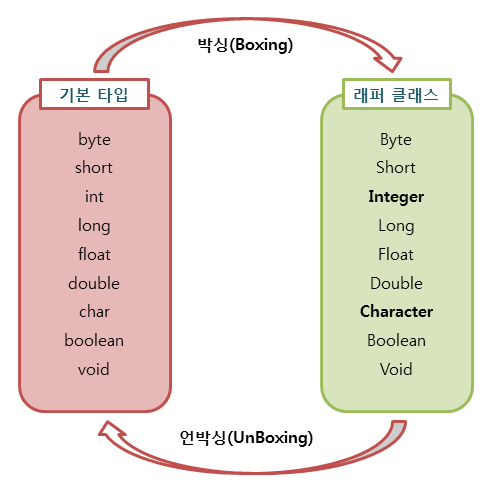
1
2
3
4
5
6
7
8
9
10
11
12
public static void main(String[] args) {

    Integer num1 = new Integer(7); // 박싱
    Integer num2 = new Integer(3); // 박싱

    int int1 = num1.intValue();    // 언박싱
    int int2 = num2.intValue();    // 언박싱

    Integer result1 = num1 + num2; // 10
    Integer result2 = int1 - int2; // 4
    int result3 = num1 * int2;     // 21
 }
JDK 1.5부터는 적절히 오토 박싱/언박싱이 된다.
Wrapper는 객체고 객체끼리는 일반적인 연산이나 비교가 안된다. 위 코드의 연산은 오토 박싱/언박싱으로 동작한 것
wrapper class tcp school
⬆ 다른 챕터도 볼 만한거 많아보인다.
표현식
- Lambda expression
- method reference
1
2
3
4
5
6
7
8
9
10
11
12
13
14
15
16
17
public static void main(String[] args) {
    Integer t = -3;

    //람다표현식
    Function<Integer, Integer> func = (a) -> Math.abs(a);
    Function<Integer, Integer> func = (a) -> {
        System.out.println("lambda");
        return Math.abs(a);
    };

    //메서드 참조
    Function<Integer, Integer> func2 = Math::abs;

    // function interface 실행은 apply 메서드
    System.out.println(func.apply(t)); //3
    System.out.println(func2.apply(t)); //3
}
ArrayList
List 자료형 중 하나
List to Array
1
2
3
4
5
6
7
8
9
10
11
12
13
    public static void main(String[] args) {
        List<Integer> t = new ArrayList<>();
        for (int i = 0; i < 10; i++) {
            t.add((int) Math.pow(i, 2));
        }

        //List -> primitive[]
        int[] t2 = t.stream().mapToInt(Integer::intValue).toArray();

        //List -> Wrapper[]
        Integer[] t3 = t.toArray(new Integer[t.size()]);
        System.out.println(t2.getClass().getName());
    }
이름붙은 반복문
반복문에 이름을 붙여 하나 이상의 반복문을 벗어날 수 있다.
while/for, break/continue 다 가능하다.
1
2
3
4
5
6
7
8
9
10
    public static void main(String[] args) {
        allLoop : for (int i = 2; i < 10; i++) {
            for (int j = 1; j < 10; j++) {
                if (i == 5) {
                    continue allLoop; //이중 루프 벗어나서 바로 continue
                }
                System.out.println(i + " * " + j + " = " + (i * j));
            }
        }
    }
1
2
3
4
5
6
7
8
9
10
11
12
13
    public static void main(String[] args) {
        int i = 2;
        allLoop :
        while (true) {
            for (int j = 1; j < 10; j++) {
                if (i == 5) {
                    break allLoop; //이중 루프 벗어나서 바로 break
                }
                System.out.println(i + " * " + j + " = " + (i * j));
            }
            i++;
        }
    }
Array, String
- Array 주요 메서드
- equals()
- toString()
- copyOf()
- copyOfRange()
- sort()
- String 주요 메서드
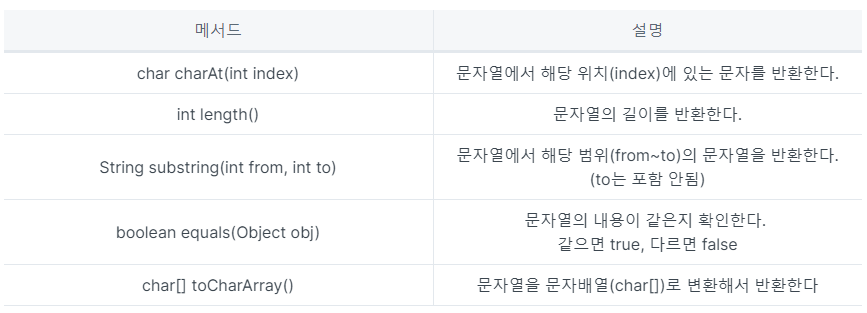
blabla
자바는 입력 값들도 원시값이 아닌 객체이길 원하는 듯 하다.
collection객체들에서 사용하는 stream method를 알아보자.
이 기사는 저작권자의 CC BY-NC 4.0 라이센스를 따릅니다.